Setting up social media accounts might seem simple. Create a profile, add some photos, start posting. But for political leaders in Bangladesh, the stakes are much higher.
A poorly configured social media presence can damage your credibility before you post a single word. Worse, fake accounts can impersonate you, spreading misinformation and destroying your reputation while you’re unaware it’s happening.
I’m Faruk Khan, and I’ve managed social media strategies for hundreds of clients over the past decade. I’ve seen political leaders lose control of their digital identity because they skipped critical setup steps. I’ve also seen how properly configured accounts become powerful tools for building trust and engaging voters.
This guide walks you through setting up each major social media platform the right way, specifically for Bangladesh’s political landscape.
Why Proper Setup Matters
You only get one chance to make a first impression on social media.
When voters find your Facebook page, they form instant judgments:
- Is this the real account? Verification badges answer this immediately.
- Is this person professional? Profile photos, cover images, and complete information signal professionalism.
- Is this person accessible? Contact information and response patterns show whether you’re actually engaging.
- Is this account secure? Security settings protect both you and your followers from hacking and impersonation.
According to DataReportal’s 2025 data, 60 million Bangladeshis use social media. That’s 34.3% of the entire population, and it’s growing by millions annually. Facebook alone reaches 51.5% of adults in Bangladesh.
These aren’t optional platforms anymore. They’re where voters research candidates, form opinions, and make decisions.
But social media only works if you set it up correctly from the start.
Understanding Bangladesh’s Social Media Landscape
Before diving into setup instructions, understand where Bangladeshi voters actually spend their time online.
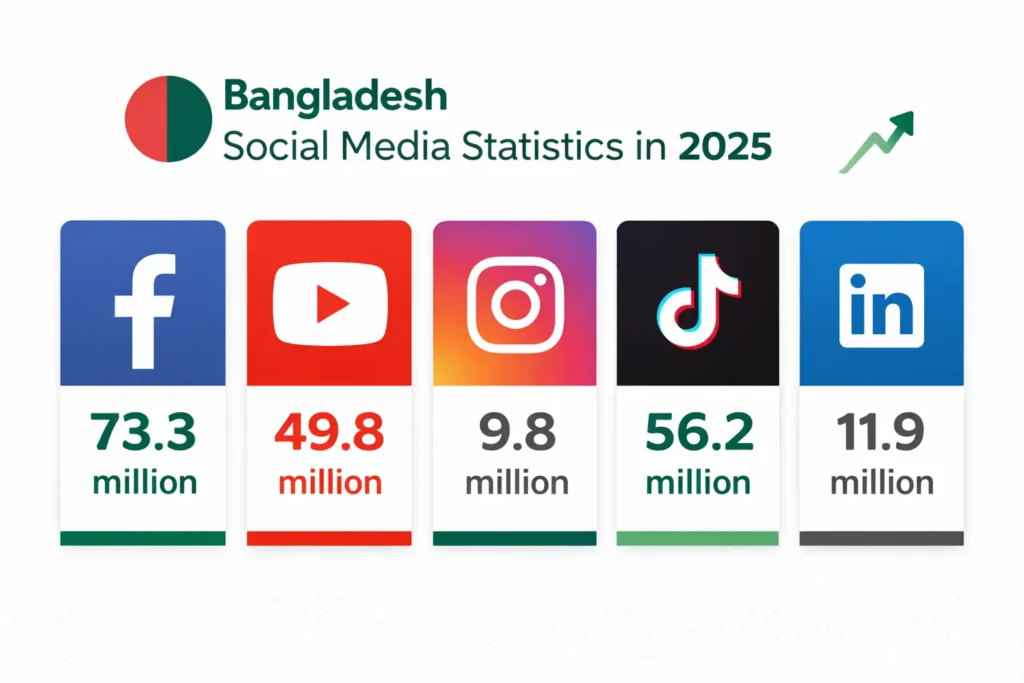
Facebook dominates completely. With 73.3 million users in Bangladesh, Facebook is where most political communication happens. If you only use one platform, it must be Facebook.
YouTube is growing explosively. 49.8 million Bangladeshis use YouTube, and that number grew 32.7% in just one year. Video content is increasingly important.
TikTok has massive reach among younger voters. With 56.2 million adult users, TikTok reaches 40% of adults in Bangladesh. If your constituency skews younger, you need to be here.
LinkedIn works for professional credibility. With 11.9 million members, LinkedIn is essential for connecting with business leaders, professionals, and educated urban voters.
Instagram serves specific demographics. 9.8 million users makes Instagram smaller but valuable for urban, educated, and younger audiences.
X (Twitter) reaches influencers. Only 1.74 million users, but they’re journalists, activists, and opinion leaders who shape conversations.
Your strategy depends on your constituency. National politicians need presence across multiple platforms. Local politicians can focus on Facebook and YouTube initially, then expand as resources allow.
Facebook Page Setup: Step-by-Step
Facebook is your most important social media platform in Bangladesh. Set it up properly.
Creating Your Public Figure Page
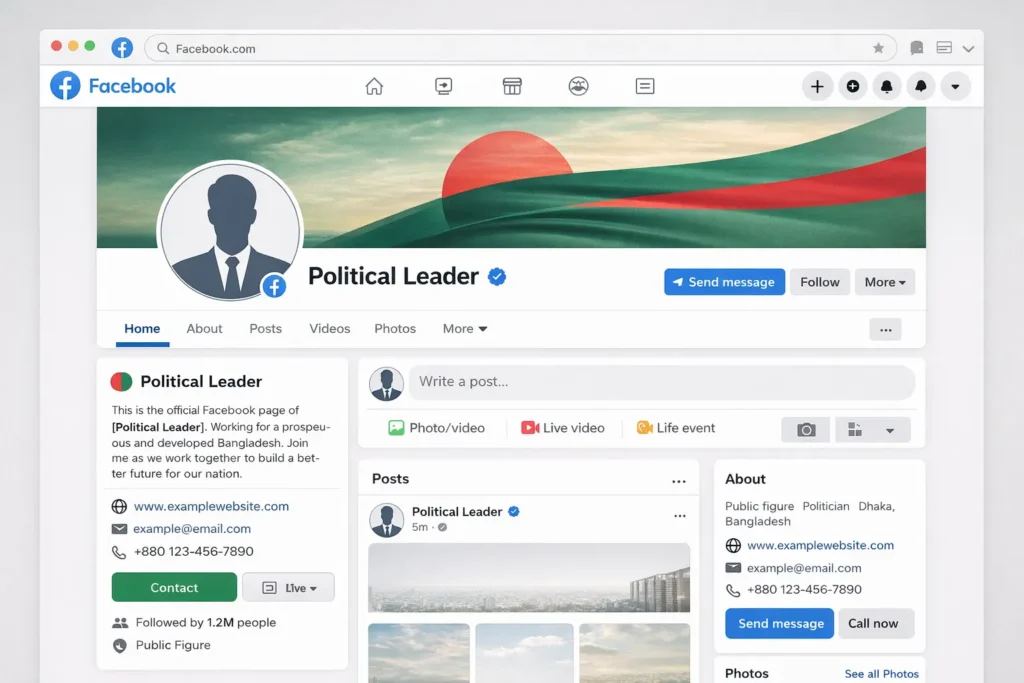
Do not use a personal profile for political communication. Personal profiles have a 5,000 friend limit and lack professional tools. Always create a public figure page.
Step 1: Create the Page
Go to facebook.com/pages/create while logged into your personal Facebook account. Select “Public Figure” as your page type.
Step 2: Name Your Page
Use your actual name exactly as it appears on official documents. This matters for verification later.
Examples:
- “Rafiq Ahmed” (if that’s your full legal name)
- “Dr. Fatima Rahman” (if you use the title professionally)
Avoid:
- “Rafiq Ahmed – Member of Parliament” (Facebook may reject this)
- “Elect Rafiq Ahmed” (this is campaign-specific, not your identity)
Step 3: Complete Basic Information
Fill in every field Facebook offers:
Category: Choose “Politician” or “Public Figure”
Bio: Write 2-3 sentences explaining who you are and what you do. Keep it simple and clear.
Example: “Member of Parliament for Sylhet-3 constituency. Working to improve education access and healthcare services for all constituents. Contact my office for assistance.”
Contact Information: Add your office phone, email, and physical address. Accessibility builds trust.
Website: Link to your political website (you should have one – see our guide on creating professional political websites).
Username: Claim a custom username like @RafiqAhmedBD or @RafiqAhmedMP. This makes your page easier to find and share.
Profile Photo and Cover Image
Your visual branding creates instant recognition.
Profile Photo Guidelines:
Use a professional headshot with these characteristics:
- Formal attire appropriate to your position
- Solid or simple background (no busy patterns)
- Friendly but professional expression
- High-quality image (at least 400×400 pixels)
- Your face should fill most of the frame
- Good lighting showing clear facial features
Upload at 400×400 pixels minimum. Facebook displays this at 170×170, but higher resolution looks better on large screens.
Cover Photo Guidelines:
Your cover photo (1640×856 pixels) can show:
- You working with constituents
- Your constituency’s landmarks
- Your campaign message or slogan
- You at official events or ceremonies
Avoid:
- Text-heavy covers (hard to read on mobile)
- Multiple small images (looks cluttered)
- Partisan symbols that alienate voters
- Personal family photos (keep it professional)
Ensure your cover photo looks good on mobile. Most viewers will see it on smartphones where it’s cropped differently than on desktop.
Configuring Page Settings
Before posting anything, configure your page settings properly.
Page Transparency:
Enable the “Page Transparency” section. This shows when your page was created and any name changes. Transparency builds trust.
Visitor Posts:
Decide whether to allow visitors to post on your page. Most political leaders disable this to maintain control over content, instead encouraging comments on your posts.
Page Roles:
Add trusted team members with appropriate roles:
- Admin: Full control (keep this very limited)
- Editor: Can post and respond but can’t manage roles
- Moderator: Can respond to comments and messages
- Advertiser: Can run ads but can’t post content
Never share your personal login. Give each team member their own role.
Messaging:
Enable Messenger so constituents can contact you directly. Set up automated responses for common questions.
Example automated response: “Thank you for contacting our office. We typically respond within 24 hours. For urgent matters, please call our office at [phone number].”
Response Time:
Facebook shows “Very responsive to messages” badges when you respond quickly. Aim to respond to messages within a few hours.
Assign someone on your team to monitor messages daily.
Facebook Verification Process
Verified accounts get the blue checkmark, which proves authenticity and builds trust.
Eligibility Requirements:
- Authentic (represents a real person)
- Unique (only one verified page per person)
- Complete (profile photo, cover photo, bio filled out)
- Notable (public figure that people search for)
How to Apply:
Go to Settings → Page Verification → Verify this Page
You’ll need to provide:
- Government-issued ID
- Phone number
- Official documentation proving your public role
Facebook reviews applications manually. Approval can take days to weeks.
If Denied:
Build your presence first. Facebook is more likely to verify accounts with:
- Significant following (thousands of followers)
- Regular posting activity
- Media mentions and news coverage
- High search volume for your name
Apply again after 30 days if initially denied.
YouTube Channel Setup
YouTube is the second most important platform for Bangladeshi politicians. Video content drives engagement unlike any other format.
Creating Your Official Channel
Step 1: Create a Brand Account
Don’t use a personal Google account. Create a “Brand Account” which allows multiple managers and looks more professional.
Go to youtube.com, sign in, and select “Create a Channel” → “Use a custom name” → Enter your name exactly as it appears officially.
Step 2: Customize Your Channel
Channel Name: Your official name (e.g., “Rafiq Ahmed Official”)
Channel Description: 2-3 sentences explaining who you are and what viewers will find on your channel.
Example: “Official YouTube channel of Rafiq Ahmed, Member of Parliament for Sylhet-3. Subscribe for speeches, town halls, constituency updates, and policy discussions.”
Channel Art: Upload banner image (2560×1440 pixels) showing your name, position, and perhaps your constituency.
Profile Picture: Use the same professional photo as your Facebook profile for consistency.
Contact Information: Add your office email in the “About” section.
Links: Add links to your website and other social media profiles.
Channel Sections and Organization
Organize your channel into playlists so viewers can easily find content:
Suggested Playlists:
- Speeches and Addresses
- Town Hall Meetings
- Constituency Updates
- Policy Explanations
- Community Events
- Media Interviews
Create these playlists even if you don’t have videos yet. You’ll fill them as you create content.
YouTube SEO Basics
Each video you upload needs optimization:
Title: Include relevant keywords. Example: “Rafiq Ahmed Speech on Education Reform – Parliament Session March 2025”
Description: First 2-3 sentences should summarize the video. Include links to your website and social media.
Tags: Add relevant tags like your name, constituency, topics discussed.
Thumbnail: Create custom thumbnails (1280×720 pixels) with clear text. Avoid YouTube’s auto-generated thumbnails.
Subtitles: Upload Bengali and English subtitles to make videos accessible and improve search rankings.
YouTube Verification
Verified channels get a checkmark next to their name.
Requirements:
- 100,000 subscribers
This threshold is high. Most local politicians won’t reach this quickly. Focus on creating quality content first. Verification follows naturally as your audience grows.
In the meantime, link your YouTube channel from your verified Facebook page and website. This helps viewers confirm authenticity.
LinkedIn Profile Optimization
LinkedIn serves a specific purpose for political leaders: connecting with professionals, business leaders, and educated voters.
Creating Your Professional Profile
Use Your Personal Profile, Not a Page
Unlike Facebook, LinkedIn works better with personal profiles for individual politicians. Pages are better for organizations.
Profile Photo: Same professional headshot from other platforms (consistent branding).
Background Photo: Choose something professional – you at official events, your constituency, or a relevant setting.
Headline: You have 120 characters. Make them count.
Good examples:
- “Member of Parliament, Sylhet-3 | Advocate for Education Reform & Healthcare Access”
- “Serving the People of Dhaka North | Focus: Youth Employment & Economic Development”
Bad examples:
- “Politician” (too vague)
- “Experienced Leader” (meaningless)
About Section: Write in first person. Tell your story in 3-4 paragraphs:
- Who you are and what you do
- Your background and experience
- Why you serve in public office
- Your key priorities and achievements
Keep it professional but personal. LinkedIn audiences want to understand your motivations and values.
Experience Section: List your political positions chronologically:
Example: Member of Parliament Bangladesh Parliament – Sylhet-3 Constituency January 2019 – Present
- Leading education reform initiatives reaching 50,000 students
- Established two new community health centers
- Secured funding for road infrastructure improvements
Be specific with achievements. Vague claims don’t build credibility.
Education: List your degrees, institutions, and graduation years. Education matters to LinkedIn’s professional audience.
Skills & Endorsements: Add skills relevant to public service:
- Public Policy
- Community Engagement
- Legislative Affairs
- Public Speaking
- Budget Management
Ask colleagues to endorse these skills. Endorsements add credibility.
LinkedIn Activity Strategy
LinkedIn isn’t like Facebook. You can’t post multiple times daily.
Post 2-3 times weekly with professional content:
- Policy analyses and position papers
- Achievements and project updates
- Thought leadership on governance issues
- Professional networking and event attendance
Write longer, more thoughtful posts than on other platforms. LinkedIn audiences expect depth.
Engage professionally:
- Comment on posts from other professionals
- Share relevant news with your analysis
- Congratulate connections on achievements
- Participate in professional group discussions
LinkedIn is about building professional relationships, not broadcasting messages.
Instagram Setup for Visual Storytelling
Instagram’s 7.5 million Bangladesh users skew younger, urban, and educated. It’s valuable for specific constituencies.
Account Configuration
Convert to Professional Account: Go to Settings → Account → Switch to Professional Account → Choose “Public Figure”
This gives you access to insights and business tools.
Username: Keep it consistent with other platforms. @RafiqAhmedBD or similar.
Name Field: Use your full name (appears in search)
Bio: You have 150 characters. Make them count:
“Member of Parliament, Sylhet-3 🇧🇩 Education & Healthcare Advocate 📧 contact@rafiqahmed.com”
Profile Photo: Same professional headshot (brand consistency)
Link in Bio: Instagram only allows one clickable link. Link to your website or a Linktree with multiple links.
Highlights: Create story highlights for:
- About Me
- Achievements
- Community Work
- Contact Info
This keeps important information accessible beyond the 24-hour story limit.
Instagram Content Strategy
Instagram is visual-first. Text matters less than photos and videos.
Post Types:
- Photos from community events
- Behind-the-scenes moments
- Quote cards with your statements
- Short video clips (Reels)
- Carousels explaining policies visually
Consistency: Post 3-4 times weekly, but quality matters more than quantity.
Stories: Use stories daily for informal updates, polls, Q&A sessions with constituents.
Hashtags: Use 5-10 relevant hashtags per post. Include location-based tags like #Sylhet or #Bangladesh.
X (Twitter) Setup for Influencers and Media
X’s 1.74 million Bangladesh users are small but influential. Journalists, activists, and opinion leaders use X more than other platforms.
Profile Configuration
Display Name: Your actual name
Username (@handle): Consistent with other platforms. Secure @YourName if available.
Bio: 160 characters to explain who you are:
“Member of Parliament, Sylhet-3. Fighting for education reform and healthcare access. Views are my own.”
Profile Photo: Same professional headshot
Header Image: 1500×500 pixels showing you working or your constituency
Location: Your constituency or city
Website: Link to your official website
Birth Date: Optional, but transparency builds trust
X Verification
X now offers verification through X Premium subscription (approximately $8/month).
The blue checkmark on X means something different than on Facebook:
- It shows you’re a paying subscriber
- It doesn’t confirm identity or notability
For political leaders, X verification is less critical than Facebook verification. Focus your verification efforts on Facebook first.
X Activity Guidelines
X is conversational and fast-paced:
Tweet frequency: 1-3 times daily
Tweet length: Keep most tweets under 280 characters (use threads for longer thoughts)
Engagement: Reply to mentions, retweet relevant content, quote tweet with your commentary
Tone: More conversational than LinkedIn, more professional than Facebook
X works well for:
- Quick reactions to news and events
- Sharing media coverage of your work
- Engaging in policy discussions
- Countering misinformation quickly
TikTok for Younger Voters
TikTok’s 46.5 million Bangladesh users make it too large to ignore, especially for reaching younger voters.
Account Setup
Create Pro Account: Switch to Business/Creator Account in settings for analytics.
Profile Name: Your actual name
Username: Consistent handle
Bio: Short, clear description with emoji:
“MP Sylhet-3 🇧🇩 | Education & Healthcare | Serving the people”
Profile Photo: Same professional headshot (or consider a more approachable photo for TikTok’s casual environment)
Link: TikTok allows one link. Use your website or Instagram link.
TikTok Strategy Considerations
TikTok is very different from other platforms:
Content is casual and authentic. Overly polished content doesn’t perform well.
Short videos (30-60 seconds) work best. TikTok audiences have short attention spans.
Trends matter. Participating in trends increases reach.
Sound and music are important. Videos with popular sounds perform better.
Engagement is algorithm-driven. Content can go viral regardless of follower count.
Many older political leaders struggle with TikTok’s casual, youth-oriented culture. If your team can’t create authentic content for this platform, it’s better to skip it than to post awkwardly.
Platform Security Essentials
Across all platforms, security protects both you and your followers.
Two-Factor Authentication (2FA)
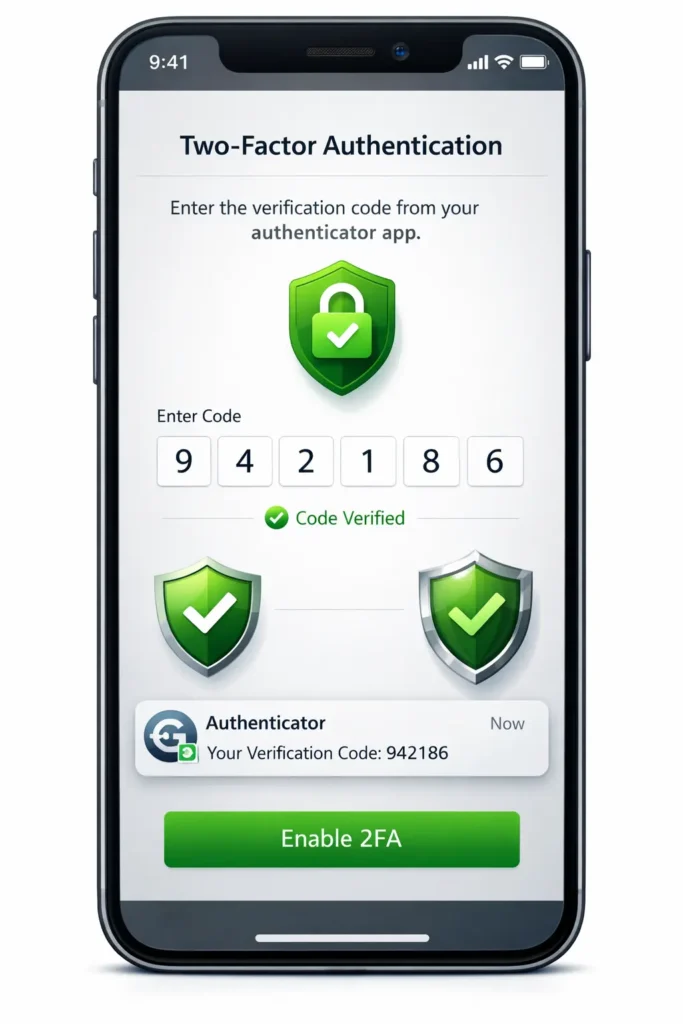
Enable 2FA on every single social media account. This requires a code from your phone in addition to your password.
How to enable:
Facebook: Settings & Privacy → Security and Login → Use Two-Factor Authentication
YouTube/Google: Google Account → Security → 2-Step Verification
LinkedIn: Settings & Privacy → Account → Two-step verification
Instagram: Settings → Security → Two-Factor Authentication
X: Settings → Security and Account Access → Security → Two-Factor Authentication
Use authenticator apps (Google Authenticator, Authy) rather than SMS when possible. SMS codes can be intercepted.
Password Management
Never reuse passwords across platforms. If one account is compromised, others remain secure.
Password Requirements:
- At least 16 characters
- Mix of uppercase, lowercase, numbers, symbols
- No personal information (birthdays, names)
- Unique for each platform
Use a password manager like Bitwarden or 1Password to generate and store complex passwords.
Account Recovery Setup
Configure account recovery options in case you lose access:
Add Multiple Recovery Methods:
- Backup email addresses
- Phone numbers
- Trusted contacts
- Security questions
Test recovery processes while you still have access. Don’t wait until you’re locked out to discover recovery doesn’t work.
Team Access Management
Never share your personal login credentials with team members.
Instead, use platform-specific team management:
Facebook: Add team members with specific roles (Admin, Editor, Moderator)
YouTube: Add channel managers through YouTube Studio
LinkedIn: You can’t give others access to personal profiles. Decide if you’ll manage it yourself or let a trusted team member post on your behalf.
Instagram/X: Use third-party tools like Hootsuite or Buffer that allow team members to schedule posts without accessing your actual account.
Document who has access to what. Review access permissions quarterly and remove anyone who no longer needs it.
Preventing and Handling Impersonation
Fake accounts impersonating political leaders are common in Bangladesh.
Prevention Strategies
Claim Your Username Everywhere: Even on platforms you don’t plan to use actively, register your name to prevent impersonation.
Verification: Apply for verification on all platforms that offer it. The blue checkmark instantly distinguishes you from fakes.
Link Between Platforms: Mention your social media handles on your website and cross-link between platforms. This helps voters identify authentic accounts.
Announce Your Official Accounts: Post on your website and through traditional media which social media accounts are actually yours.
Handling Fake Accounts
When you discover impersonation:
Document Everything: Take screenshots showing the fake account, their posts, and their profile information.
Report to the Platform:
Facebook: Visit the fake profile → Click “…” → Find Support or Report Profile → Impersonation
Instagram: Visit profile → “…” → Report → It’s Pretending to Be Someone Else
X: Report → They’re pretending to be me or someone else
Inform Your Followers: Post on your official accounts warning about the fake account. Include screenshots so followers know what to look for.
Contact Platform Support Directly: If standard reporting doesn’t work, reach out to platform support teams explaining you’re a public figure being impersonated.
Consider Legal Action: For serious cases causing reputational damage, consult with lawyers about legal options in Bangladesh.
Platforms usually respond faster when verified accounts report impersonation. This is another reason verification matters.
Creating Consistent Branding
Your profiles should look cohesive across platforms.
Visual Consistency:
- Use the same profile photo everywhere
- Use consistent colors and design elements
- Keep your name format consistent
Messaging Consistency:
- Use similar bio descriptions
- Maintain consistent tone
- Present the same core message
Contact Information:
- Provide the same email and phone across platforms
- Link to the same official website everywhere
Consistency builds recognition. When voters see your profile on any platform, they should immediately recognize it as you.
Integration Strategy
Your social media accounts should work together, not in isolation.
Cross-Promotion:
- Announce your YouTube videos on Facebook
- Share Instagram posts to Facebook
- Tweet links to your Facebook Live sessions
Unified Content Calendar: Plan content across all platforms simultaneously. A major announcement should be communicated everywhere, adapted to each platform’s format.
Consistent Posting Schedule:
- Facebook: Daily
- YouTube: 2-3 times weekly
- LinkedIn: 2-3 times weekly
- Instagram: 3-4 times weekly
- X: 1-3 times daily
Analytics Review: Check insights on all platforms weekly. Notice what content performs best where. Adjust your strategy based on data.
Understanding how to manage your social media presence professionally extends beyond just setup. For comprehensive strategies on creating trust-building content, handling criticism, engaging voters, and managing your overall digital reputation, see our complete guide on online reputation management for Bangladeshi politicians.
Common Setup Mistakes to Avoid
After setting up hundreds of social media accounts, I’ve seen these mistakes repeatedly:
Using personal profiles instead of pages. Facebook personal profiles max out at 5,000 friends and lack professional tools.
Inconsistent naming across platforms. This confuses voters who can’t be sure which accounts are really you.
Incomplete profiles. Missing contact information makes you seem inaccessible.
No verification attempts. Many political leaders never apply for verification because they assume they won’t qualify.
Weak security. Accounts without 2FA are vulnerable to hacking.
Too many administrators. Every person with admin access is a security risk.
Ignoring fake accounts. Impersonation damages your reputation. Report it immediately.
Platform-specific usernames. Using @RafiqAhmedBD on Facebook but @RafiqMP on X creates confusion.
Generic bio descriptions. “Politician working for the people” says nothing distinctive.
Low-quality profile photos. Blurry, poorly lit, or casual photos undermine professionalism.
Your Social Media Setup Checklist
Before announcing your social media presence publicly, verify:
Facebook:
- Public figure page created (not personal profile)
- Profile photo (400×400+, professional)
- Cover photo (1640×856, appropriate content)
- Complete bio with contact information
- Custom username claimed
- Page roles assigned to team members
- Two-factor authentication enabled
- Verification application submitted
YouTube:
- Brand account created
- Channel customization complete
- Channel art uploaded (2560×1440)
- Profile picture uploaded
- Channel description written
- Contact information added
- Initial playlists created
- Website and social links added
LinkedIn:
- Profile photo uploaded
- Background photo added
- Compelling headline written
- About section completed
- Experience section detailed with achievements
- Education listed
- Skills added
- Custom LinkedIn URL claimed
Instagram:
- Converted to a professional account
- Bio optimized (150 characters)
- Profile photo uploaded
- Link added
- Story highlights created
- Contact button enabled
X (Twitter):
- Display name and username set
- Bio written (160 characters)
- Profile photo uploaded
- Header image added
- Location specified
- Website linked
- Two-factor authentication enabled
Security (All Platforms):
- Two-factor authentication enabled
- Strong, unique passwords set
- Password manager configured
- Recovery options configured
- Team access properly assigned
- Login activity reviewed
Timeline for Complete Setup
Week 1: Foundation
- Create accounts on all major platforms
- Upload profile photos and cover images
- Write bio descriptions
- Enable two-factor authentication
Week 2: Optimization
- Complete all profile fields
- Add contact information
- Claim custom usernames
- Link between platforms
Week 3: Security & Access
- Configure team access
- Test recovery options
- Review security settings
- Document all logins and access
Week 4: Verification
- Apply for Facebook verification
- Build presence and following
- Announce official accounts
- Monitor for impersonation
Don’t rush. Properly configured accounts are worth the time investment.
Maintaining Your Accounts Long-Term
Setup isn’t a one-time task. Social media requires ongoing maintenance.
Weekly Tasks:
- Review security settings
- Check for fake accounts
- Monitor mentions and tags
- Respond to messages and comments
Monthly Tasks:
- Update contact information if changed
- Review team access permissions
- Check verification status
- Update profile photos if needed (new official photos)
Quarterly Tasks:
- Comprehensive security audit
- Review all platform connections
- Update bio descriptions if roles change
- Assess which platforms deliver results
Social media platforms constantly change. Settings you configured months ago might need adjustment. Features you didn’t have access to might now be available. Stay current.
Getting Help: DIY vs Hiring Professionals
You have three options for social media management:
Manage It Yourself
Pros: Complete control, authentic voice, lowest cost
Cons: Time-consuming, learning curve, might miss best practices
Best for: Local politicians with limited budgets
Hire a Social Media Manager
Pros: Professional management, consistent posting, better strategy
Cons: Cost (25,000-40,000 BDT monthly), need to trust someone with access
Best for: Most district and division-level politicians
Hire a Digital Marketing Agency
Pros: Complete strategy, multiple team members, comprehensive service
Cons: Most expensive (50,000-150,000+ BDT monthly)
Best for: National-level politicians with significant budgets
Even if you hire help, you must understand social media fundamentals. This guide gives you that foundation.
Final Thoughts
Social media setup seems simple, but proper configuration makes the difference between accounts that build credibility and accounts that damage it.
With 60 million Bangladeshis on social media and millions joining every year, your social media presence shapes voter perception. Taking time to set up accounts properly pays dividends in credibility, security, and effectiveness.
Start with Facebook. Get that right before expanding to other platforms. Once Facebook is configured properly and you’re posting consistently, add YouTube. Then LinkedIn. Then Instagram and X if your constituency and resources support it.
Don’t try to be everywhere at once. Master one platform before adding another.
The digital landscape in Bangladesh is growing rapidly. Voters expect political leaders to have a professional social media presence. Your accounts are where that presence lives.
Set them up right from the start.
Need help setting up and managing your social media accounts? Our team specializes in creating professional, secure social media presence for Bangladeshi political leaders. We handle everything from account creation to verification to ongoing management. Contact us for a free consultation on your social media strategy.